Transfer ChatGPT Memory to Claude: What Actually Moves
Claude's memory import tool is real — but it only moves saved snippets, not your history. Here's exactly what transfers, what doesn't, and what fills the gap.
Something shifted in early 2026. OpenAI's Pentagon deal and changing policies drove hundreds of thousands of users to reconsider their AI platform. Claude hit #1 on the App Store free charts. Anthropic reported free user growth of over 60% since January — and then Claude crashed twice in 24 hours under what it called "unprecedented demand."
For the first time, AI platform switching felt like a mainstream decision, not a technologist experiment. And for the first time, the question of what you lose when you switch became urgent enough for a major AI company to build a direct answer.
On March 2, Anthropic launched claude.com/import-memory: paste a prompt into ChatGPT, copy its output, import it into Claude. Five minutes. No technical setup. Your AI memory, transferred.
It's a genuine step forward. It's also worth being clear-eyed about what it actually does — and where it stops.
How the Official Tool Works
The claude.com/import-memory page — Anthropic's official tool for bringing your AI memory from ChatGPT, Gemini, or Copilot into Claude. (Source: Anthropic)
The process is deliberately simple:
- Go to claude.com/import-memory and copy the pre-written export prompt
- Paste it into a new ChatGPT conversation — ChatGPT responds with a structured summary of your saved preferences
- Copy that output and paste it into Claude's memory import field
- Wait up to 24 hours for Claude to process and apply the context
No browser extension, no account linking, no API credentials. Anthropic made Memory free for all users simultaneously — it had previously been paywalled behind Claude Pro. The privacy positioning is also notable: Claude's memory is encrypted and not used for model training, unlike some competitors.
What transfers well:
- Tone and format instructions you've given your AI ("be concise," "use bullet points")
- Professional context you've shared: name, job title, industry, ongoing projects
- Stated preferences and recurring topics you've explicitly discussed
- "Always / never" style instructions
For users whose AI interactions are primarily preference-driven and explicit, this delivers a meaningful head start on a new platform.
What the Tool Captures — And What It Doesn't
Here's the part most coverage glosses over.
The import tool transfers stored memory snippets — the facts and preferences that ChatGPT had explicitly decided to save. It does not transfer the conversational context that built up through months of actual use: the iterative refinements, the implicit patterns the AI learned from watching you work, the evolving understanding of your reasoning style and domain vocabulary.
Most of your valuable AI context lives in conversation history, not in a memory settings page. The import tool doesn't touch conversation history.
Several practical friction points also emerged from early users:
ChatGPT may export very little. Multiple testers reported the prompt returning minimal output from ChatGPT, even after months of usage. ChatGPT appears to limit what it exports through this workflow — the tool's effectiveness depends entirely on what your source AI had explicitly saved.
24-hour processing delay. Memory updates run in daily synthesis cycles. You paste context in and wait a day before it takes effect.
One-time snapshot, no ongoing sync. This is a migration tool, not a bridge. Context you build on ChatGPT after the import stays there. You'd need to repeat the process manually to capture future updates.
Variable incorporation. Anthropic marks the feature as experimental and notes that "Claude may not always successfully incorporate imported memories." Some users found preferences weren't reliably reflected in conversations.
Professional-focus filter. Claude's memory system is designed around work tasks and may silently drop personal details unrelated to professional context.
The Core Gap: Stored Snapshots vs. Continuous Context
The real limitation isn't a bug in the import tool — it's structural.
AI platforms save "memory" as periodic snapshots: facts and preferences the model has decided are worth noting. But the most valuable kind of AI context — the kind that makes switching genuinely costly — is continuous. It's the understanding that emerges from hundreds of conversations over months: never explicitly stated, but showing up as the AI seeming to truly understand how you think.
This continuous context doesn't live in memory settings. It lives in conversation history. And conversation history stays on the platform where it was created.
As one guide for switchers put it: "Your personalization doesn't just live in stored memory — it lives in how you've used the tool over time."
Side-by-Side: Claude's Official Tool vs. Memdex
 Memdex sits as a shared memory layer across all your AI tools — not locked to any single platform. (Source: Memdex)
Understanding the difference helps you choose the right approach for your situation.
| Claude Official Import | Memdex | |
|---|---|---|
| Setup | No install needed | Browser extension (Chrome, Edge, Firefox) |
| What it captures | Saved memory snippets only | Continuous conversation context |
| Update frequency | One-time snapshot | Automatic, ongoing |
| Platforms supported | Claude only | ChatGPT, Claude, Gemini, and others |
| Processing delay | Up to 24 hours | Real-time capture |
| Storage location | Claude's servers | Your personal Memdex account |
| Works across employers | No — tied to your Claude account | Yes — independent of any platform account |
| When to use | Deliberate one-time switch to Claude | Ongoing cross-platform memory portability |
The official tool is the right choice if you're making a deliberate, permanent switch to Claude and want a fast way to carry your explicit preferences over — with no setup friction.
Memdex is the right choice if you use multiple AI tools, plan to switch platforms again as better models arrive, or want your accumulated context to stay portable regardless of which AI you're using at any given time.
The two aren't mutually exclusive. Many users start with the official import to get immediate context in Claude, and use Memdex to ensure their memory keeps growing and stays portable from that point forward.
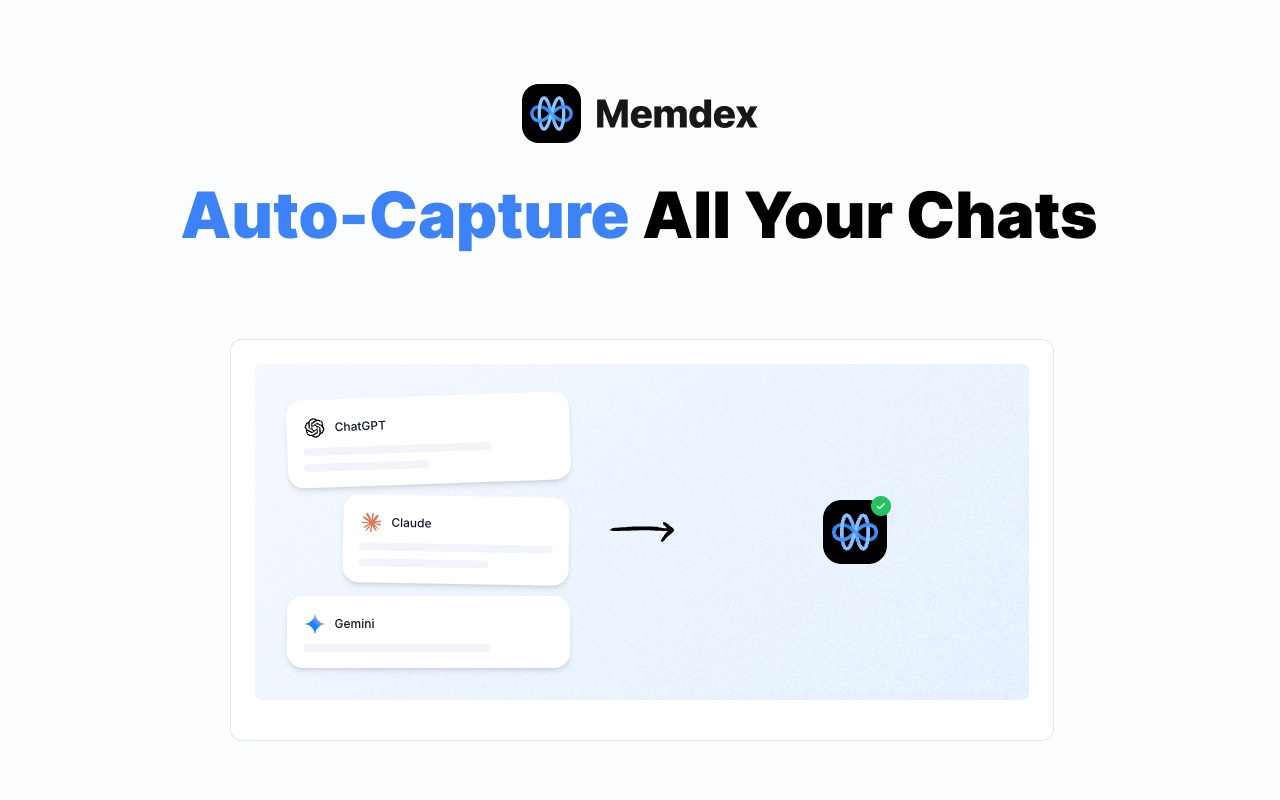 Memdex captures context from every AI platform continuously in the background — no manual export needed. (Source: Memdex)
Your Memory Should Outlive Every Model
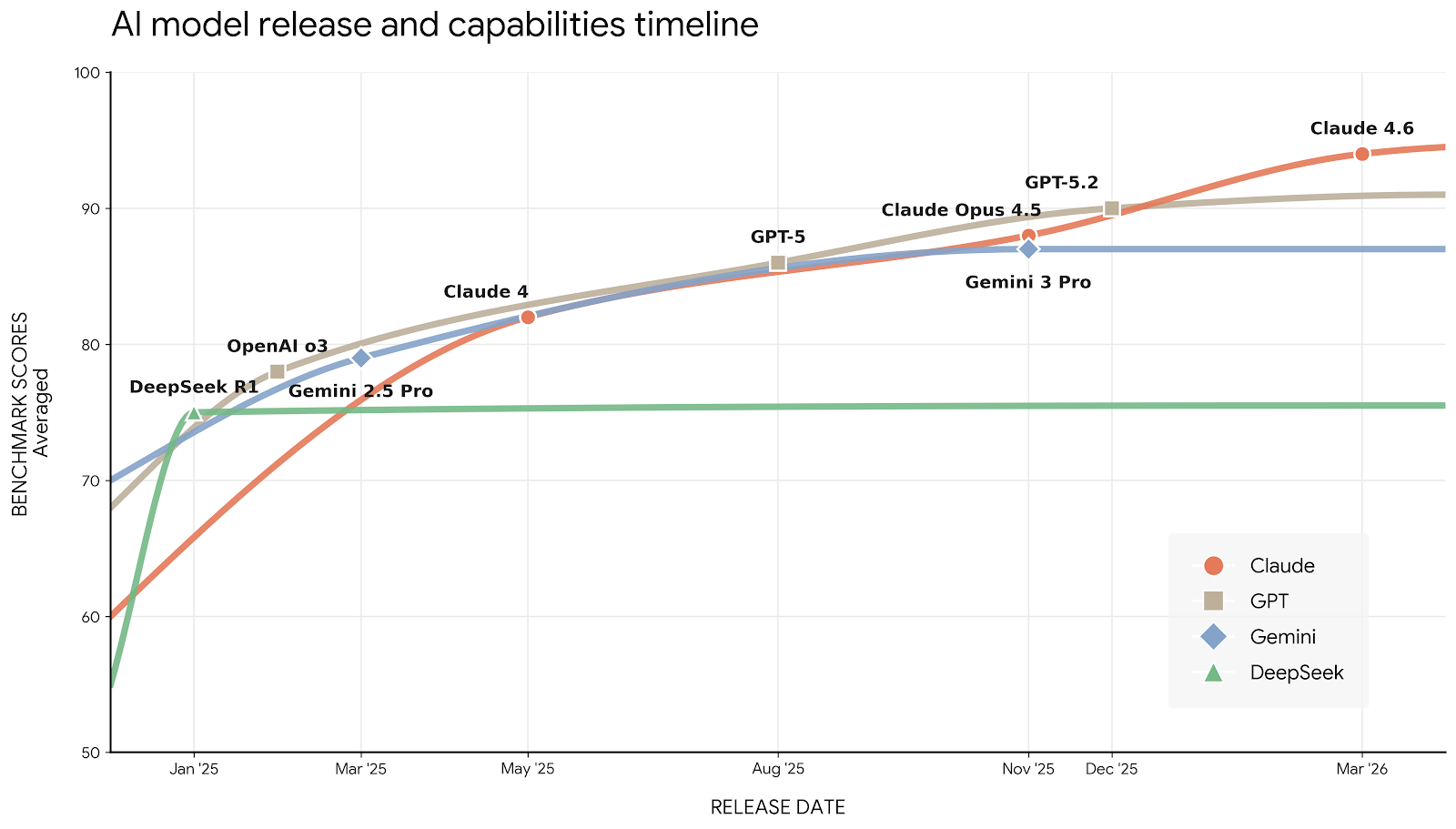 Frontier AI capabilities more than doubled from early 2025 to early 2026, with new SOTA models arriving every few weeks.
Look at the trajectory. GPT-3.5 to GPT-4. GPT-4 to o1. o1 to GPT-5. Claude 3 to Claude 4 to Claude 4.6. Each generation delivers meaningfully better results — and that pace isn't slowing down. GPT-6, Claude 5, Gemini 4 are already being built. The next model that matters to your work is probably 3–6 months away.
Here's what that means if your memory lives inside a single platform's account: every new model release forces a tax. You either stay on the older model (safe, but falling behind) or migrate to the new one (better, but pay the re-onboarding cost again). The more valuable your accumulated context, the more painful that choice becomes.
The solution is to store your memory somewhere that isn't inside any model's account at all — on your own side of the conversation.
When Memdex captures your AI context, it stores it in your personal account on your device and our servers. It's not inside OpenAI's infrastructure. It's not inside Anthropic's. It's not inside Google's. When GPT-6 launches and you want to try it, your full context is already there waiting. No import prompt. No 24-hour delay. No risk of the export being blocked. You just open the new model and pick up where you left off.
Claude's outage on March 2-3 — triggered by the mass migration — illustrated the other side of this: platform dependency is real. When Claude went down, work stopped for thousands of people mid-migration. Storing your memory outside any single platform means an outage becomes an inconvenience, not a data loss event.
Frequently Asked Questions
Does the import work for free Claude users? Yes. Anthropic made Memory free for all Claude users when it launched the import tool in March 2026.
Will imported memories stay current? No. The import is a one-time snapshot. New context you build on ChatGPT after the import date won't automatically appear in Claude.
Does this work with Gemini or Copilot too? Yes — the same workflow works with any AI that has a memory feature. The export prompt is designed to be pasted into any assistant, though results vary by platform.
What if I want to undo the import? Go to Claude Settings → Memory and delete imported entries individually.
The Bottom Line
The official tool solves a real problem: the friction of starting from scratch when you switch platforms. For a deliberate one-time move to Claude, it's a meaningful improvement over copying and pasting context manually.
What it doesn't solve is the deeper structural issue: your AI memory being tied to whichever platform's account it was built on, with no ongoing portability as models improve and circumstances change.
For professionals who interact with AI daily, a portable memory layer — one that captures context continuously, stores it in your own account, and travels with you across platforms and employers — is the more durable answer.
Memdex — continuous AI memory capture, stored in your account, available across any platform. Browser extension for Chrome, Edge, and Firefox.